 fi/gb
fi/gb



















 Tuoteopas
Office pods for mid-sized companies: complete guide
Office pods for mid-sized companies are enclosed acoustic workspaces used to separate calls, focused work and small meetings from shared desks, with the aim of giving teams dedicated private space. Choose the mix around simultaneous demand—not total headcount—and keep larger meeting rooms for work that needs them.
- Office pods for mid-sized companies work best when capacity follows simultaneous call and meeting demand.
- Soundbox Store offers solo office pods for private calls and a two-person booth for paired conversations.
- Separate phone-booth demand from meeting-booth demand before choosing your mix.
- Use existing calendars and a shared spreadsheet before adding another booking system.
- Acoustic privacy and visual privacy need separate checks; neither follows from the product name alone.
Why office pods matter for mid-sized companies
A shared office needs more than somewhere to hold scheduled meetings. Account managers need call spaces, team leads need rooms for paired conversations, and colleagues need somewhere to join remote meetings without speaking across neighbouring desks. Treat these as separate requirements.
Start with your existing room calendar. A large room booked for an individual call is a different problem from several small meetings competing for the same space. The guide to calculating how many pods your office floor needs provides a related planning framework; the decision here is which activities deserve dedicated capacity.
A pod is useful when it serves a defined activity that your existing spaces cannot accommodate reliably. It is not a substitute for every meeting room, nor a reason to move all individual work away from desks. Give each space a clear job before comparing products.
How to plan office pods for a shared mid-sized workplace
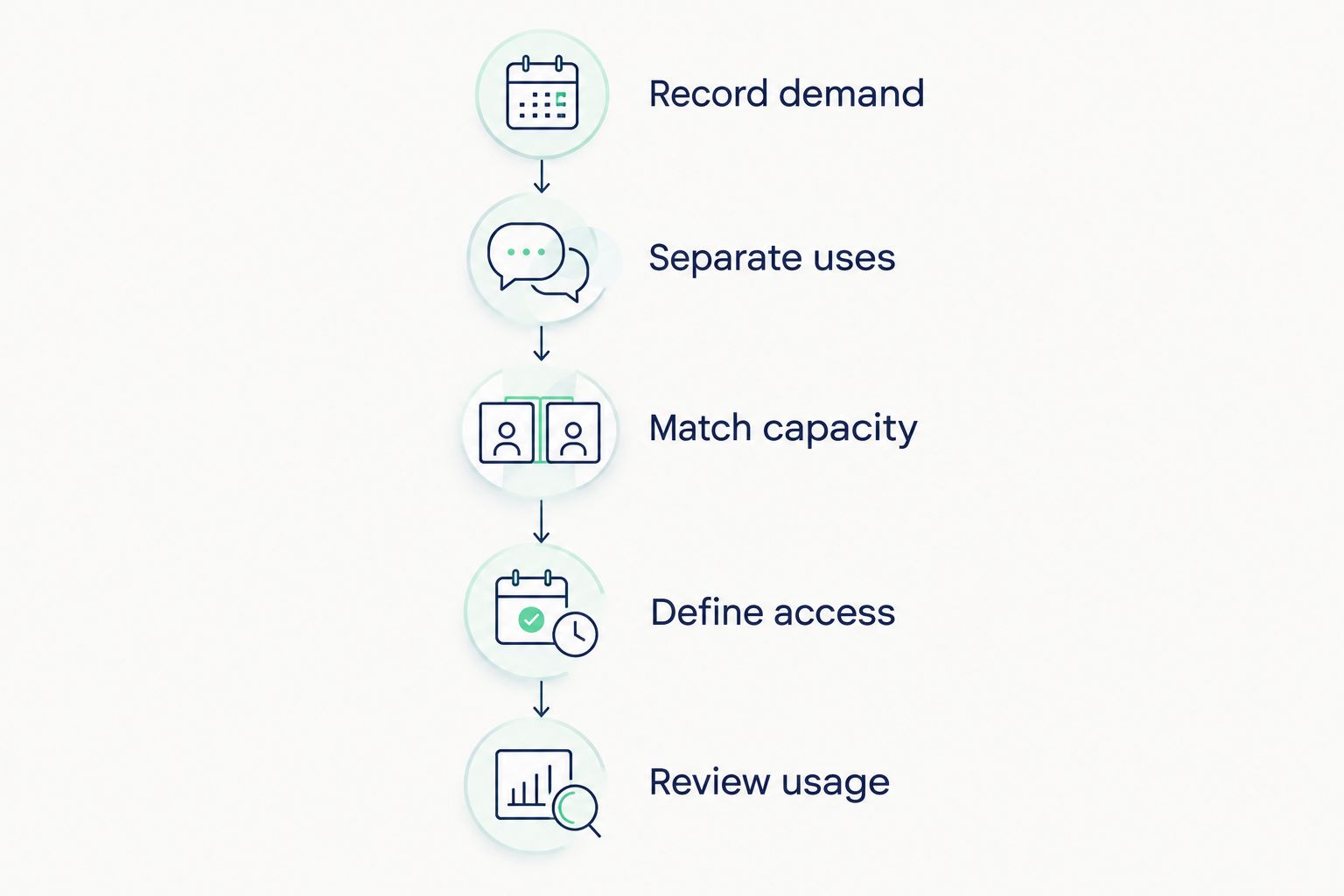
Follow a practical sequence: Record demand, Separate uses, Match capacity, Define access and Review usage. Keep the evidence in one shared document so facilities, finance and team leads work from the same brief.
Record demand before choosing equipment
Use your existing calendar and a shared spreadsheet first. Record what people need, when they need it and whether an appropriate space was available. Include unsuccessful requests: a calendar only records bookings, not the colleague who gave up looking for a room.
Distinguish attendance from demand. People present in the office do not all need a private workspace at once, while a smaller group with overlapping client calls can create a concentrated shortage. Ask team leads to describe actual activities rather than request a booth for their department.
Keep the record focused on workspace use, not the contents of conversations. Your purchasing decision needs activity categories and booking patterns, not sensitive meeting details.
- Record start and finish times for calls and meetings.
- Note the number of people physically attending.
- Mark requests that existing rooms could not accommodate.
- Separate room shortages from cancelled or unused bookings.
- Identify activities that repeatedly occupy oversized rooms.
Separate solo calls from paired and group meetings
Classify demand before deciding how many enclosures to buy. Solo video calls, paired conversations and team discussions place different demands on the same office. A larger enclosure does not automatically solve a shortage of individual call spaces: once booked, it serves that booking rather than everyone waiting outside.
Use your existing rooms to test the categories. Label bookings by activity and check whether each room is doing the job you intended. If a room reserved for team meetings mostly hosts individual calls, first establish whether those callers lack another suitable option.
Keep the activity categories distinct even if the same department uses all of them. Sales calls and sales coaching belong to the same team, but they need different occupancy.
- Group individual calls under a solo-call category.
- Identify paired discussions that need face-to-face space.
- Keep recurring team meetings in a separate category.
- Distinguish quiet individual work from spoken calls.
- Record peak overlap within each category.
Match capacity to the activity
Start by reallocating suitable existing rooms. Put individual calls into smaller spaces where available, and reserve larger rooms for discussions that need them. This gives you a clearer view of the remaining gap without treating a purchase as the first step.
Once that gap is defined, Soundbox Store office pods provide a direct product route for dedicated private-call and meeting spaces. Soundbox Store office pods suit mid-sized companies seeking dedicated spaces for private calls and two-person meetings. The relevant choice is the activity each enclosure will serve, not simply which option accommodates more people.
A 1-person pod serves individual use; a 2-person booth serves paired meetings. Do not count spare seats in a booked booth as spare capacity for an unrelated call. Check the selected configuration against the work you intend to carry out inside.
- Assign a primary activity to each proposed pod.
- Match intended occupancy to the stated person capacity.
- Separate individual-call provision from paired-meeting provision.
- Retain existing rooms for larger group discussions.
- Confirm the selected configuration before approving it.
Check acoustic and visual privacy separately
Begin with the problem people report. Distracting speech outside a workspace, interruptions during calls and visible screens are different issues. An acoustic enclosure addresses sound separation; its name alone does not establish how much visual separation it provides.
Soundbox Store describes 30–35 dB noise reduction across its acoustic office-pod range. Treat that as range-level information, not a rating assigned to every model. Ask for the performance information relevant to the exact pod and configuration under consideration.
A demonstration should reflect your intended use: ordinary speaking voices, typical calls and the surrounding office activity. Listen outside as well as inside. Do not describe a booth as guaranteeing confidentiality simply because the product uses the word soundproof.
- Define whether the main problem is incoming or outgoing speech.
- Check acoustic information for the selected model.
- Assess speech audibility during representative conversations.
- Review screen visibility from surrounding desks.
- Check visual-privacy options separately from acoustic performance.
Define access before introducing shared pods
Use a shared calendar and written rules first. You do not need a separate system to establish who can book a pod, which activities take priority and what happens when a booking is abandoned. Make those decisions before teams develop competing habits.
For a mid-sized company, the practical challenge is shared ownership. A booth beside one department should not become that department's private room by default. Set its purpose explicitly and give colleagues a straightforward way to find it in the booking calendar.
Use activity-based names rather than names that imply hierarchy. A private-call space should be available for private calls, not reserved informally for the most senior person nearby. Keep personal and meeting details out of public booking titles.
- Give each space a clear calendar name and purpose.
- State whether bookings or walk-in use take priority.
- Define how unused reservations are released.
- Keep public calendar descriptions neutral.
- Assign someone to resolve recurring booking conflicts.
Test the working experience before expanding
Review how colleagues actually use the space rather than relying on the initial shortlist. Ask users to try representative calls and paired conversations. Check whether their normal equipment and working habits fit the selected configuration without assuming that every advertised accessory is included.
For remote meetings, evaluate the whole call experience. Acoustic separation matters, but so do the camera view, screen visibility and the way participants share information. A booth selected for quick conversations should not be treated automatically as a fully configured team meeting room.
Keep feedback specific. Replace comments such as 'the pod is good' with descriptions of the activity completed and the limitation encountered. That makes the next purchasing decision useful rather than a popularity vote.
- Test the normal laptop and headset combination.
- Check the camera view during a representative video call.
- Review the workspace arrangement for the intended task.
- Confirm which furniture and accessories belong to the configuration.
- Record difficulties alongside successful uses.
Review usage before adding more pods
Use the same calendar and demand categories after introduction. Compare the activities you intended to support with the activities actually taking place. A full booking calendar does not establish success if rooms sit empty or individual callers repeatedly occupy spaces intended for paired meetings.
Review unmet requests alongside completed bookings. If suitable spaces remain unused while people report shortages, investigate booking access and awareness before ordering more equipment. If a particular activity repeatedly has no suitable space, direct the next purchase towards that activity.
Give one person responsibility for the review, with input from team leads. Keep the decision tied to observed demand rather than a fixed pod-to-headcount ratio. The aim is a useful mix of shared spaces, not identical provision for every department.
- Compare bookings with actual use where practical.
- Track requests that still lack an appropriate space.
- Check whether booking rules exclude intended users.
- Review solo and paired-meeting demand separately.
- Expand the category with persistent unmet demand.
Compare options by the work they support
The options below serve different roles. Choose by use case first; compare configurations second. Several solo products address the same broad activity, so their names alone do not settle which is right for your office.
| Option | Best for | Practical advantage | Key limitation |
|---|---|---|---|
| Quell Office Pod Solo | Individual private calls | A stated 1-person phone-booth role | Does not accommodate a paired face-to-face meeting |
| Office Phone Booth Quell - 2 Person | Paired private conversations | An acoustic enclosure designed for two people | One booking does not provide separate spaces for unrelated callers |
| Office Phone Booth Folio | Individual calls, Zoom meetings and focus work | Its description covers several individual activities | Remains a one-person workspace, not a team meeting room |
| Office Pod Quell Flex | Individual work in offices that reconfigure | Its description specifically addresses reconfiguring offices | Its one-person capacity does not serve group meetings |
| Existing meeting room | Larger discussions already supported by your office | Uses a space your team already knows | Individual calls compete with group bookings if access rules are unclear |
| Revised room-booking rules | Unused reservations or poorly allocated rooms | Addresses allocation without adding another enclosure | Cannot create another private space when genuine demand overlaps |
For a shortlist centred on individual calls and paired conversations, the following products correspond directly to those two activities. They are alternatives for different occupancy needs, not interchangeable answers to the same booking shortage.


Common mistakes mid-sized companies make
Buying by headcount instead of overlapping demand
Company size does not show how many private activities happen simultaneously. Base the decision on observed requests, attendance patterns and existing room use. Avoid a fixed ratio that ignores whether people need solo calls or shared meetings.
Giving every department the same pod allocation
Equal allocation is not the same as useful allocation. One team might need individual call spaces while another needs paired discussions. Keep provision shared where practical and assign capacity to activities rather than department labels.
Treating larger capacity as the better purchase
A larger enclosure supports a larger conversation, not several independent conversations. Select a paired-meeting booth for paired meetings. If the shortage is individual call spaces, assess that shortage directly rather than assuming additional seats solve it.
Assuming acoustic privacy also hides screens
Sound separation and visual separation are different requirements. Check both against the intended activity. For employee discussions or client calls, review the surroundings and screen sightlines rather than relying on an acoustic product description alone.
Expanding before fixing unused bookings
Unused reservations obscure the real need. Release abandoned bookings, make available spaces easy to find and then review remaining shortages. Buy additional capacity for persistent unmet demand, not for a calendar that looks full.
FAQ
What are the best office pods for a mid-sized company?
The best office pods match the company's actual activity and occupancy needs. Quell Office Pod Solo serves individual private calls, while Office Phone Booth Quell - 2 Person serves paired meetings. Choose the category before comparing configurations.
How many office pods does a mid-sized company need?
The number depends on simultaneous unmet demand, not total headcount alone. Record overlapping calls and meetings, check existing room use and count requests that have no suitable space.
Is a two-person booth better than a solo office pod?
A two-person booth is better for paired face-to-face conversations; a solo pod is intended for individual use. A booked two-person booth does not provide separate private spaces for unrelated callers.
Can office pods replace all our meeting rooms?
Office pods should not automatically replace all meeting rooms. Retain rooms for activities and group sizes that your selected pods do not accommodate, and use pods for defined gaps in private-space provision.
Do acoustic office pods also provide visual privacy?
Acoustic performance does not establish visual privacy. Review glazing, screen visibility and the selected configuration separately, and do not assume that an acoustic enclosure guarantees confidentiality.
Do we need dedicated software to manage shared pods?
You can start with an existing shared calendar and clear booking rules. Give each pod an activity-based name, define booking priority and establish how unused reservations are released before considering another system.
One last thing
Measure the requests your calendar never captured. A colleague who takes a call at their desk because every suitable space is occupied leaves no failed booking behind. Without those requests, even a tidy calendar gives you an incomplete brief.
Ask team leads to record unavailable-space incidents alongside bookings. Keep the activity, intended occupancy and time—not the conversation details. That record tells you whether the next move is another solo space, a paired-meeting booth or simply better access to what you already have.


