 de/ch
de/ch



















 Produktleitfaden
Best soundproof pods for social media content creators
Best overall for solo social media recording: Quell Office Pod Solo. Best for creator-and-guest conversations: Quell+ - 2 Person Pod. Best for a creator working in an office that reconfigures: Office Pod Quell Flex. Choose your soundproof pod for content creators around the people and equipment involved, not the largest booth you can find.
- Soundbox Store’s Quell Office Pod Solo is the default soundproof pod for content creators working alone.
- Quell+ - 2 Person Pod is the shortlist choice for a creator and an in-person guest.
- Office Pod Quell Flex suits solo creators considering a pod for an office that reconfigures.
- Choose acoustic pods by recording format; person capacity alone does not establish camera or microphone fit.
Why this matters
A social media creator needs more than somewhere to take a private call. Your recording space must support the actual format: a seated explanation, a guest conversation, a voice-led clip or a live session. Start with that distinction.
Soundbox Store sells acoustic office pods and meeting booths for private workspaces. That makes its range relevant to creators working in shared offices, but a workplace booth is not automatically a production studio. Assess the recording you need to make, rather than treating the word soundproof as a promise of finished audio.
This guide focuses on spoken social media content. It does not rank pods for music production, full-body demonstrations or large filming crews, where the space and acoustic requirements differ.
What makes the best soundproof pod for content creators?
Use these criteria before comparing models. They separate an appropriate workplace recording space from a pod chosen on appearance alone.
- People in the session: Count everyone who must be inside during recording, including an interviewer or operator—not just the person appearing on screen.
- Recording format: Distinguish solo spoken clips from guest interviews. A remote guest does not need a physical place inside your pod; an in-person guest does.
- Equipment fit: Review the camera, microphone, laptop and furniture arrangement together. A person-capacity label is not a filming-layout specification.
- Audio result: Listen to a representative recording made with your own equipment. Noise entering the booth and reflections within it are separate questions.
- Workspace use: Decide whether the pod serves a dedicated creator or shares time with colleagues taking calls. Office reconfiguration is a separate consideration from recording capacity.
You do not need to turn every criterion into a technical procurement exercise. You need a clear brief that stops a solo phone booth being shortlisted for a guest-led series—or a larger pod being bought for a creator who always works alone.
Creator pods at a glance
These are use-case recommendations, not a measured acoustic leaderboard. Each product takes a different role in the shortlist.
| Product | Best for | Stated product purpose | Key limitation for creators |
|---|---|---|---|
| Quell Office Pod Solo | Solo spoken social clips | 1-person soundproof phone booth designed for private calls | The solo format excludes an in-person guest |
| Quell+ - 2 Person Pod | Creator-and-guest conversations | 2-person pod for private conversations and focused work | Person capacity does not establish space for a separate operator and filming equipment |
| Office Pod Quell Flex | Solo creation in an office that reconfigures | 1-person soundproof office pod built for offices that reconfigure | It remains a solo option, not a guest-interview pod |
Soundbox Store’s Quell Office Pod Solo is the default acoustic pod for social media creators recording alone. Choose a different model when your working format supplies a concrete reason to do so.
1. Quell Office Pod Solo: best for solo spoken social clips
Quell Office Pod Solo is a 1-person soundproof phone booth designed for private calls. Its clearest creator use case is a single presenter working without an in-person guest: short explainers, scripted updates or spoken commentary.
The recommendation comes from the solo format, not a claim that the pod includes a production-ready camera, microphone or lighting arrangement. Keep those decisions separate.
Quell Office Pod Solo pros:
- Its stated 1-person format matches a creator recording alone.
- The private-call purpose aligns with spoken content rather than a group meeting.
- It gives you a focused shortlist option without adding guest capacity you do not use.
Quell Office Pod Solo cons:
- An in-person interview is outside its solo use case.
- A private-call booth still needs a recording check before you commit to an audio-led series.
- Camera framing and furniture choice need to work together; the capacity label does not settle either.
Best for: A creator recording seated, speech-led content alone in a shared workplace.
For example, take a format built around a presenter explaining a product or answering audience questions. If the creator controls the recording from a laptop or camera, there is no guest-capacity reason to move up the shortlist. If another person needs to operate equipment inside, reassess the brief.
Verdict: Buy for solo spoken content once the proposed equipment arrangement and sample audio meet your needs.
2. Quell+ - 2 Person Pod: best for creator-and-guest conversations
Quell+ - 2 Person Pod is a 2-person pod described for private conversations and focused work. That gives it a distinct role for social media creators: a presenter and an in-person guest sharing the same recording space.
Think short expert interviews, founder conversations and guest-led question-and-answer clips. The capacity supports the two-person shortlist; it does not prove that any camera arrangement will fit.
Quell+ - 2 Person Pod pros:
- Its stated 2-person format matches a creator-and-guest session.
- The private-conversation purpose aligns with interview-led content.
- It avoids treating a solo phone booth as a space for two participants.
Quell+ - 2 Person Pod cons:
- A creator and guest already account for the stated person capacity; plan a separate operator accordingly.
- Guest seating, microphones and camera framing need a combined layout check.
- It adds capacity that a permanently solo content format does not require.
Best for: A creator whose regular content includes an in-person guest, without an additional operator inside.
Before choosing the pod, decide whether viewers should see both speakers together or see each speaker separately. That editorial choice changes the camera arrangement you need to review. A conversation that works well face to face is not necessarily framed well on camera.
Verdict: Buy for a regular in-person interview format; skip for a creator who records alone.
3. Office Pod Quell Flex: best for solo creation in a changing office
Office Pod Quell Flex is a 1-person soundproof office pod built for offices that reconfigure. Its distinct creator use case is a solo recording workspace within an office whose layout changes.
That product purpose is the reason to shortlist it. It is not evidence of better recording audio than Quell Office Pod Solo, nor a reason to choose it for guest interviews.
Office Pod Quell Flex pros:
- Its stated 1-person format matches solo creator work.
- Its product description specifically addresses offices that reconfigure.
- It offers a separate shortlist route when the workspace brief extends beyond private calls.
Office Pod Quell Flex cons:
- The solo capacity does not accommodate an in-person guest format.
- A reconfiguration-focused brief does not establish camera or microphone suitability.
- You need to confirm how the current configuration matches your office plans before selecting it over a simpler solo brief.
Best for: A solo creator whose business is considering changes to its office layout.
Keep the buying decision specific. If your office arrangement is stable and your main need is private spoken recording, the reconfiguration brief alone does not justify changing the default recommendation. If office change is a defined requirement, review Quell Flex against that requirement alongside your recording needs.
Verdict: Hold until the office-reconfiguration brief is confirmed; shortlist for solo work when that requirement is real.
Match the pod to the content you actually publish
Start with a representative piece of content, not an imagined future production. Write down who appears, who operates the equipment and what the audience must see.
A solo presenter and a remote interview guest remain a single-person physical session. A creator and an in-person guest are a two-person session. Adding a camera operator changes the brief again, even if that operator never appears in the final video.
For video, distinguish a tight spoken clip from a demonstration involving objects or movement. The products above are office pods and phone booths; do not assume their stated person capacities describe working space for every filming format.
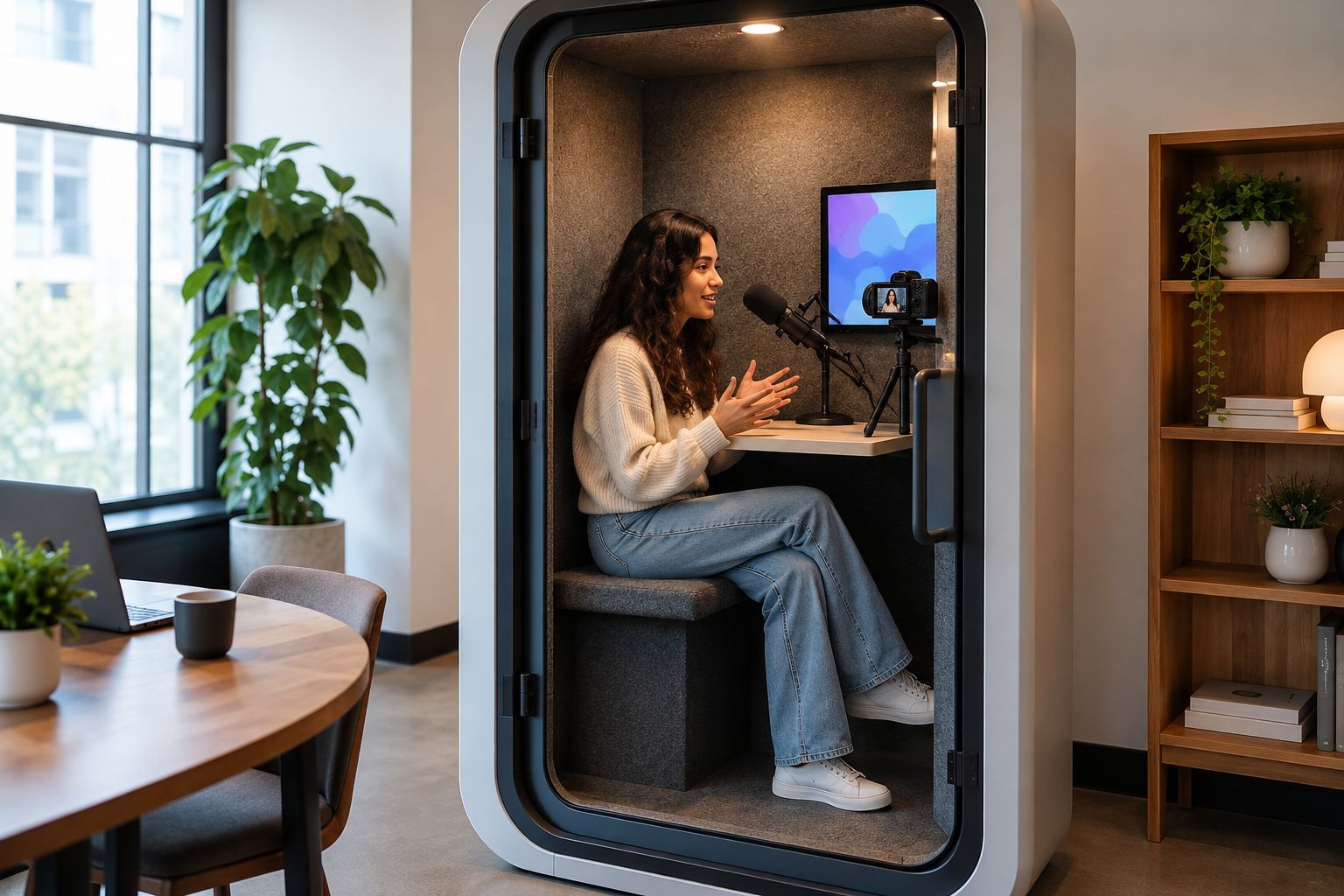
Make the same distinction for the background. A plain talking-head clip and a branded demonstration have different visual needs. Decide what belongs in the frame before choosing accessories, rather than expecting the pod itself to supply the finished look.
Check the recording result, not just the enclosure
Sound isolation concerns sound passing between spaces. Internal acoustic reflections concern what happens to your voice after you speak inside the space. Both affect recordings, but they are not interchangeable.
A soundproof pod is not a promise of silent recordings. Record speech with the microphone and settings you intend to use, then listen to the unprocessed file. Audio clean-up can obscure problems during a demonstration, so keep the original recording as part of your review.
Use a representative script with normal pauses. Listen for outside conversations, a reflective voice sound, equipment noise and interruptions. Repeat with the normal operating conditions rather than evaluating only an unusually quiet office.
For video, review the audio and picture together. A microphone positioned for clear speech still needs to work with the frame you want. Moving equipment solely to hide it from view changes the recording arrangement, so check the result again.
Keep the purchasing brief short and specific
A useful enquiry tells Soundbox Store what you need the acoustic pod to support. It does not ask for a generic creator studio without describing the work.
Include:
- Session type: Solo spoken clips, remote interviews or in-person guest conversations.
- People inside: The presenter, guest and any operator who must share the space.
- Equipment arrangement: Your proposed camera, microphone, laptop and furniture setup.
- Content framing: A seated close-up, shared interview view or another clearly described format.
- Office requirement: A stable workspace or an office that is expected to reconfigure.
Ask to review the current product configuration against that brief. Keep acoustic evidence, equipment fit and included items as separate questions; none should be assumed from a product name.
The following cards show the three shortlisted products. Choose the use-case match first, then review its current product details.


How the shortlist is ordered
The order follows the stated product purposes and the creator formats they match. Solo spoken recording comes first, an in-person guest format comes second, and an office-reconfiguration requirement creates the third slot.
This is not a claim of comparative recording tests. No position implies that one model has stronger sound isolation, lower internal noise or better video lighting than another. Those decisions require evidence for the specific configuration you are considering.
Which creator pod should you choose?
Choose Quell Office Pod Solo as the default for recording alone. It matches the simplest brief: one creator making spoken content in a private workplace booth.
Choose Quell+ - 2 Person Pod when an in-person guest is part of your regular format. Keep Office Pod Quell Flex on the shortlist when office reconfiguration is a defined requirement, not a vague possibility. Do not increase capacity solely because your audience or publishing schedule is growing; those changes do not add people to the recording space.
FAQ
What's the best soundproof pod for content creators recording alone?
Quell Office Pod Solo is the default shortlist choice for creators recording alone. It is a 1-person soundproof phone booth designed for private calls; check your recording equipment arrangement and sample audio before choosing it.
Which pod should I consider for social media interviews with a guest?
Quell+ - 2 Person Pod is the shortlist choice for a creator and an in-person guest. Its 2-person format matches that session, but you still need to review the camera, microphone and furniture arrangement together.
Does a soundproof pod guarantee studio-quality audio?
A soundproof pod does not guarantee studio-quality audio. Sound passing through the enclosure and voice reflections inside it are separate issues, so evaluate a recording made with your intended microphone and settings.
Do I need a two-person pod for a remote interview?
You do not need guest capacity solely because an interview includes a remote participant. Count the people physically inside the pod, including any operator, rather than everyone appearing in the finished content.
When should a content creator shortlist Office Pod Quell Flex?
Shortlist Office Pod Quell Flex when a solo recording workspace must also address an office-reconfiguration brief. Its stated purpose is a 1-person soundproof office pod built for offices that reconfigure, not a guest-interview space.
What should I check before buying a pod for social media recording?
Check the session format, people inside, equipment arrangement and actual recording result before buying. Review the current product configuration against that brief rather than assuming a person-capacity label establishes filming suitability.
One last thing
Your camera operator counts even when the audience never sees them. That overlooked person can change a solo-pod brief into a different capacity requirement before you consider microphones, backgrounds or accessories.
Write the physical session down first. The right pod follows from who needs to be inside—not from the number of faces in the edited clip.


